
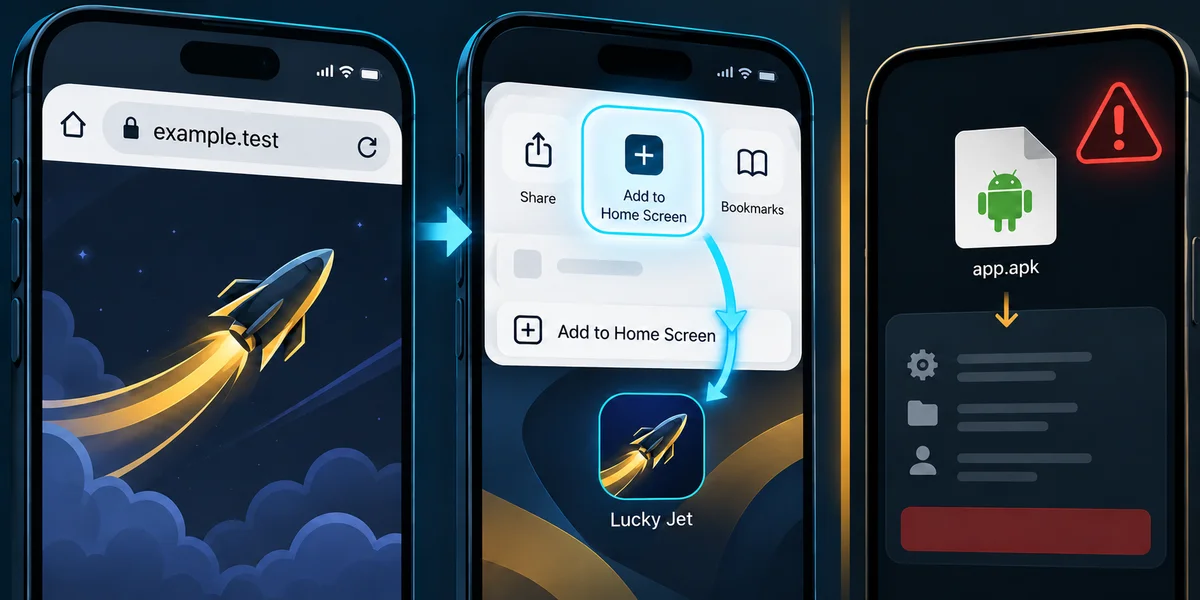


Mobile web access lets you open a supported game without first installing a separate package. A home-screen icon can make returning more convenient, while an actual packaged app is a different distribution choice. Choose the route available to your device and account, and confirm the destination before entering credentials. Registration and partner links remain directly accessible; installation is not a prerequisite imposed by this guide.
This review, dated 23 October 2026, checks platform documentation rather than a particular Lucky Jet application binary. No APK version, signing certificate, permission inventory, device benchmark or store listing has been independently tested here. The practical steps below distinguish what the platform supports from what a specific operator currently offers. A familiar icon does not bridge that evidence gap.
Compare access routes
| Route | Convenience | Evidence still needed |
|---|---|---|
| Mobile browser | Open a supported site directly | Correct destination, account and current rules |
| Home-screen shortcut or web app | Return from an icon where supported | Actual launch mode and available features |
| Packaged application | Separate app if genuinely offered | Publisher, version, distribution and package evidence |
Opening a site in a browser is not the same as installing an Android APK. Adding a home-screen shortcut can also differ from launching a standalone web app, depending on the site and platform. These choices can change launch convenience and visible browser controls. They do not establish a different game outcome law, a guaranteed faster cashout or an automatic right to use the service in every country.
Stores permit some licensed gambling apps
Apple guideline 5.3.4 requires local permissions, geographic restrictions and free distribution for real-money gambling apps. It does not impose a Swift-wrapper requirement. Google Play's policy also permits qualifying licensed gambling apps in selected countries after approval. Neither policy proves a particular Lucky Jet listing is genuine or available to you.
Check the listing's publisher, linked official service, country availability and current account requirements. A guide, simulator and real-money operator app can have similar names while serving different purposes. Do not label every store result malware or assume none could be legitimate. Conversely, store presence and favourable reviews do not replace verifying that the listing is the intended product.
Apple also documents alternative distribution in eligible regions, with device, version and location conditions. Therefore a universal claim that all outside-App-Store installation is impossible is incorrect. That platform facility does not certify this operator's app or require you to use it. Do not change country settings or bypass access restrictions merely to follow an installation guide.
Use an optional iPhone home-screen route
Apple's current Safari instructions provide a convenient route: open the intended site, use the page menu or Share, choose Add to Home Screen, select Open as Web App where offered, and add it. Layout and operating-system version affect the visible controls. Name the icon so you can recognise the intended destination.
Safari is not the only browser that can offer this action. WebKit documents third-party browser support since iOS and iPadOS 16.4. Availability depends on the browser and site. Do not assume every saved icon opens fullscreen, receives notifications, works offline or has a native app's exact capabilities. A shortcut itself is not proof of the operator's identity.
After adding an icon, open it and verify the expected service before signing in. Inspect the actual account and game controls rather than relying on a copied screenshot. If the action is unavailable, ordinary browser access may still be sufficient. There is no need to install an unknown profile or certificate simply to create a website shortcut. A missing menu item does not establish an account failure.
Android web access and APK installation are separate
For a supported web app, Chrome's Android help describes More, Install and create shortcut, then Install. Follow the controls actually shown; older versions may use different labels. This is a web-app route, not verification of a downloaded APK or a promise that this particular site offers every web-app feature.
If you separately choose a packaged app, obtain the current distribution link through the intended service and check the publisher information. A package filename containing “latest” proves neither freshness nor ownership. Read the version, update path and installation details rather than assuming a universally named file. If its origin or requested privileges are unclear, browser access remains an alternative where supported.
Android requires signed APKs, but a signature alone does not prove a package belongs to the claimed operator or is free of harmful behaviour. Android's verification tool can inspect signatures and certificates. Establishing identity additionally needs a trusted publisher reference; a hash identifies the exact bytes, not their safety. No such package comparison was performed for this guide.
Review permissions in context. Absence of SMS or contacts access is not a malware-free certificate; a request for a sensitive permission is not by itself a completed Trojan analysis. The relevant question is whether the exact version's behaviour and permissions are justified and independently understood. Do not grant accessibility, device administration or other powerful access simply because an unrelated screenshot says the application is official.
Google Play Protect distinguishes warnings and blocks for different reasons. This guide gives no blanket instruction to ignore a harmful-app alert or turn off protections. Installation controls can also depend on device policy and Android version. If a warning appears, identify the reason and verify the exact package before deciding; no gambling action requires overriding it here.
Rendering, network and settlement are different measurements
A smooth animation is not a confirmed cashout. Rendering concerns frames displayed by the device. Network delay concerns communication to the service actually handling the request. Settlement concerns the accepted bet and the provider's rules. A desktop mouse, touchscreen and APK label do not by themselves supply comparable timing data. The table identifies useful evidence rather than presenting unperformed laboratory tests.
| Question | Appropriate observation |
|---|---|
| Is the display smooth? | Frame timing on the identified device/client |
| Did the request reach its recipient? | Acknowledgement from the actual service |
| Was a bet paid? | Accepted bet, settlement record and balance |
| Is a package the intended release? | Exact version, bytes and trusted signer reference |
To compare clients meaningfully, specify device, operating system, browser or package version, network, server endpoint, test workload and repeated observations. Separate animation frame timing from request acknowledgement. One ping to an unrelated server cannot certify cashout latency. This article supplies no measured input latency, memory benchmark or guaranteed frame rate for this client on arbitrary phones.
Auto-cashout can remove the target-time manual click after its instruction is accepted. That does not establish zero network risk or guaranteed millisecond settlement. A late manual request can also be paid under different rules. The execution guide distinguishes intended targets, arrival and payment assumptions. Installing another client does not itself change those rules or make the outcome predictable.
Check the device before changing settings
Apple states that Low Power Mode limits ProMotion refresh to at most 60 Hz. It is not a universal 30 Hz cap for every phone or proof that switching it off guarantees a particular frame rate. Other devices and power modes differ. Keep the distinction between a documented platform setting and measured behaviour of this game.
If the page stutters, note device state, battery mode, available connection and the exact symptom before changing anything. Compare supported conditions without assuming 5 GHz Wi-Fi always beats mobile data or guarantees sub-50-millisecond service latency. A strong signal, a fast animation and a reliable request confirmation are different observations. Do not make a live wager merely to test an unclear display problem.
Finish with account state, not the animation
Before leaving, check accepted stakes, pending settlements and any enabled repeated participation. Closing a browser or app does not prove cancellation of instructions already accepted. Retain relevant records if the display and balance differ. The beginner guide covers those states. Mobile convenience can simplify access, but no installation, performance setting or home-screen icon guarantees profit, withdrawal or security for every package.